
Flash the HBA to IT firmware.
https://kbhost.nl/knowledgebase/flash-dell-h310-hba-to-it-mode/
Install or update VMware ESXi.
https://kbhost.nl/knowledgebase/update-vmware-esxi-using-putty/
Create a Virtual Storage Network.
https://kbhost.nl/knowledgebase/create-a-virtual-storage-network/
Configure the HBA for Passthrough.
Reboot VMware.
Create VM and Install FreeNAS.
https://kbhost.nl/knowledgebase/freenas-basic-nfs-config/
19. Setup ZFS VMware-Snapshot coordination.
Storage. Vmware-Snapshot. Add VMware-Snapshot. Map your ZFS dataset to the VMware data store.
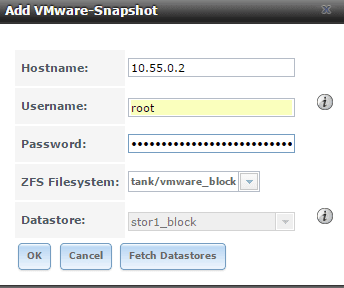
20. Periodic Snapshots
Add periodic snapshot jobs for your VMware storage under Storage, Periodic Snapshot Tasks. You can setup different snapshot jobs with different retention policies.

21. ZFS Replication
If you have a second FreeNAS Server (say stor2.b3n.org) you can replicate the snapshots over to it. On stor1.b3n.org, Replication tasks, view public key. copy the key to the clipboard.
On the server you’re replicating to, stor2.b3n.org, go to Account, View Users, root, Modify User, and paste the public key into the SSH public Key field. Also create a dataset called “replicated”.
Back on stor1.b3n.org:
Add Replication. Do an SSH keyscan.
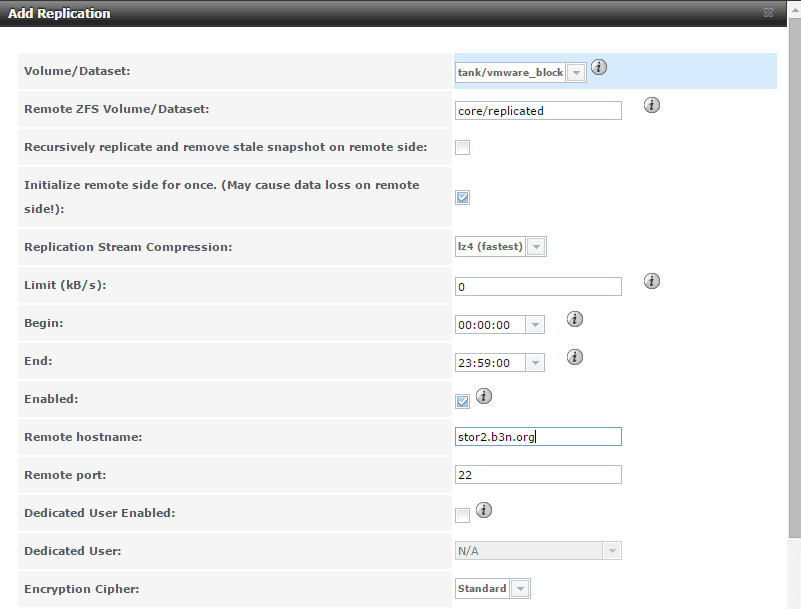
And repeat for any other datasets. Optionally you could also just replicate the entire pool with the recursive option.
21. Automatic Shutdown on UPS Battery Failure (Work in Progress).
The goal is on power loss, before the battery fails to shutdown all the VMware guests including FreeNAS. So far all I have gotten is the APC working with VMware. Edit the VM settings and add a USB controller, then add a USB device and select the UPS, in my case a APC Back-UPS ES 550G. Power FreeNAS back on.
On the shell type:
dmesg|grep APC
This will tell you where the APC device is. IN my case it’s showing up on ugen0.4. I ended up having to grant world access to the UPS…
For some reason I could not get the GUI to connect to the UPS, I can selected ugen0.4, but under the drivers dropdown I just have hyphens —— … I set it manually in /usr/local/etc/nut/ups.conf
However, this file gets overwritten on reboot, and also the rc.conf setting doesn’t seem to stick. I added this tunable to get the rc.conf setting…
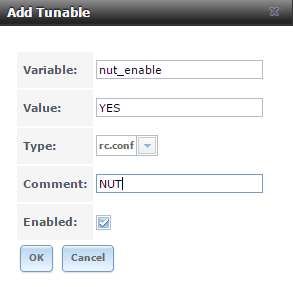
And I created my ups.conf file in /mnt/tank/ups.conf. Then I created a script to stop the nut service, copy my config file and restart the nut service in /mnt/tank/nutscript.sh
Then under tasks, Init/Shutdown Scripts I added a task to run the script post init.
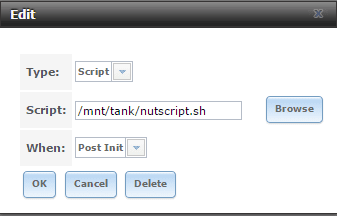
Next step is to configure automatic shutdown of the VMware server and all guests on it… I have not done this yet.
There’s a couple of approaches to take here. One is to install a NUT client on the ESXi, and the other is to have FreeNAS ssh into VMware and tell it to shutdown. I may update this section later if I ever get around to implementing it.